Web Hardening
A Brief Overview of Web Hardening
What is Web Hardening?
Web hardening is the intentional process of enhancing an application’s security posture—by reducing its effective attack surface.
The majority of these enhancements are made at the application layer—defining and permitting how web resources may be interacted with.
In the following sections I will discuss hardening/mitigation strategies: locking down headers, HSTS, SNI traps, key exchange, and a live demo.
Reverse Proxies
Reverse proxies are essential applications for establishing the secure flow of web traffic.
Oftentimes, many reverse proxies are NOT hardened by default—enabling a high ceiling for potential administrative misconfiguration.
(Displayed below is a capture demonstrating a major educational institution; there are no hardening artifacts present).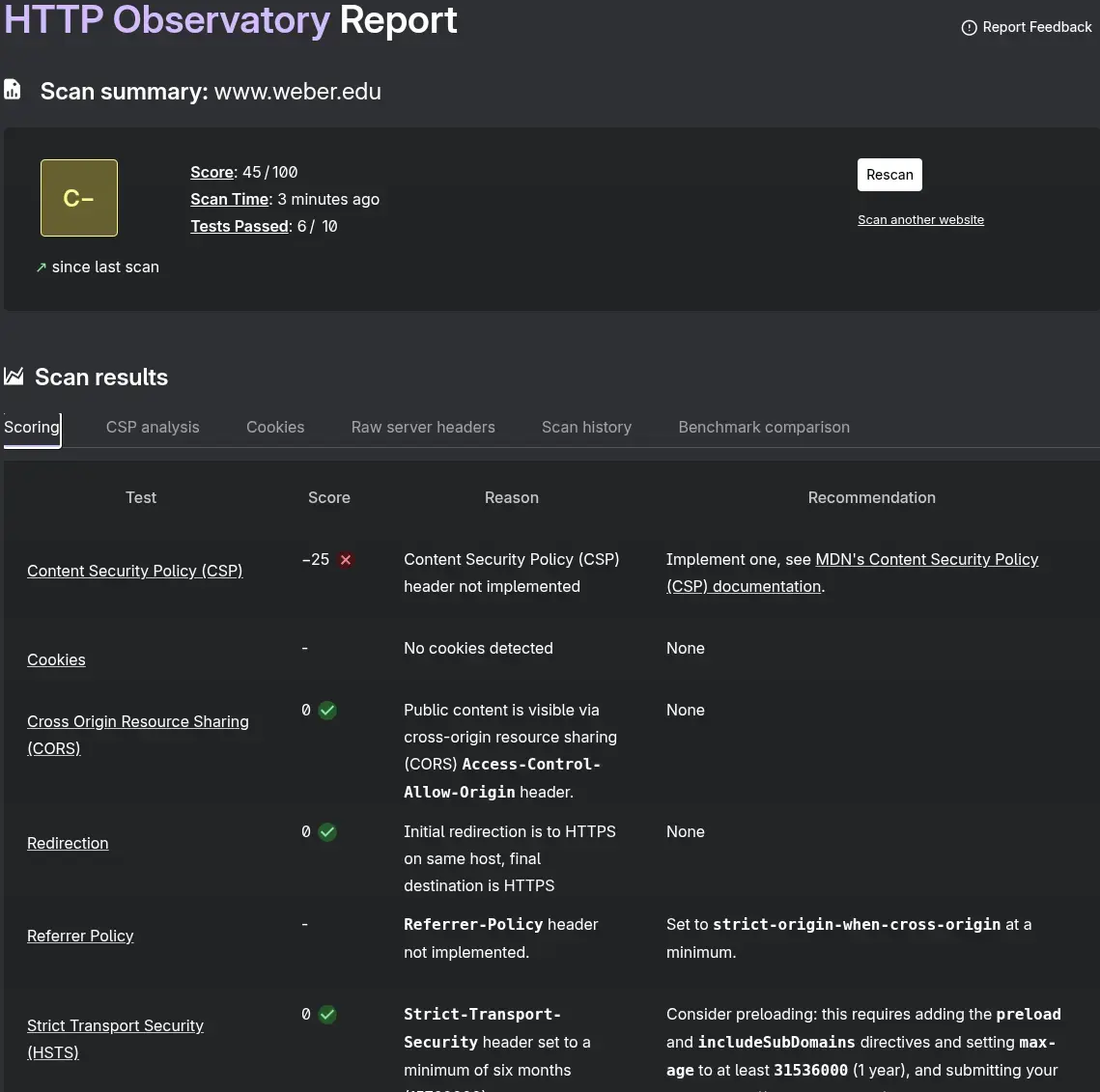
The Web
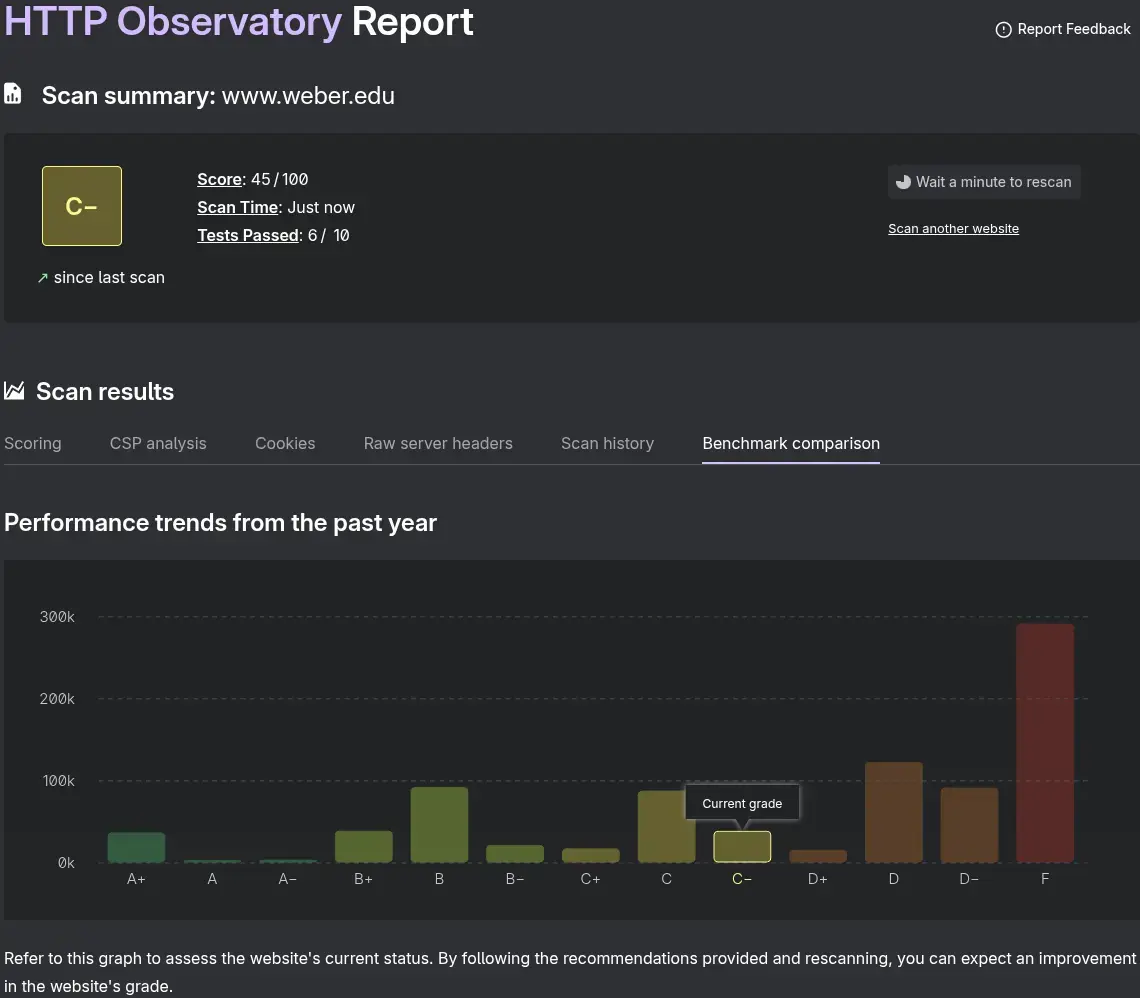
Many corporations and entities are STILL quite slow regarding their adoption of comprehensive web hardening.
Though some configurations may not be enacted due to compatibility concerns:
-
TLS 1.1: Mainly retained due to interoperability concerns in emerging markets (legacy Java runtimes, Windows/IE, and Android), although this is declining.
-
Legacy Cipher Suites: For many modern browsers these are not required (think key exchange akin to ~ TLS_RSA_WITH_AES_128_CBC-SHA).
-
RSA Dependence: A major oversight—as only antiquated browsers/runtimes lack forward secrecy (ECDHE).
-
HTTP/2: Largely a non-issue, only affecting the speed at which non-capable (HTTP/1.1) clients load content; even QUIC (HTTP/3) support is relatively sparse.
Terminology
Key Concepts
-
TLS 1.3: The latest iteration of Transport Layer Security, a massive leap forward due to perfect forward secrecy; the TLS 1.2 era RSA exchange is deprecated—ephemeral key exchange is utilized (ECDHE).
-
DNS Security Extensions (DNSSEC): introduces digital signatures to DNS records—preventing MITM and spoofing attacks (critical for modern sites).
DNSSEC Heavily Relies on PKI:
Resulting in a robust chain of trustDNSKEY (root public key) signs DS for .xyz.
DNSKEY (tld public key) signs DS for tuckett-test.xyz.
KSK (public key) verified by .xyz’s DS.
ZSK (public key) signed by KSK (private key).
A record (tuckett-test.xyz) signed by ZSK (private key).
-
DNS Certificate Authority Authorization (CAA): Permits which certificate authorities may permit TLS/SSL certificates; incredibly useful for preventing rogue issuance and impersonation.
-
AEAD Ciphers: Modern cryptographic primitive that is essential for TLS 1.3 deployment; encryption follows a combined step compared to CBC’s separate encrypt and MAC functions.
-
ALPN: Enables the client to propose which protocol (HTTP/1.1, HTTP/2, or HTTP/3) it wants to use when interacting with the server (during the TLS handshake); ALPN.
-
QUIC (HTTP/3): Replaces traditional TCP web traffic (TCP + TLS + HTTP/2) to a singular layer over a UDP stream (443); headers are encrypted, clients send data on the first packet (0-RTT Resume vs HTTP/2 1-RTT)—offering exceptional benefits in speed.
-
Server Name Indication (SNI): SNI is sent in the TLS ClientHello—allowing servers (vHosts) to select the correct certificate during the handshake.
-
HTTP Strict Transport Security (HSTS): A modern browser security feature and security policy—forcing clients to ONLY communicate using HTTPS.
-
Content Security Policy (CSP): Web headers that define server-to-client behavior—specific policies that determine how resources are accessed/interacted with, CSS elements, scripts, forms, embeds, objects, and requests.
-
Subresource Integrity (SRI): An essential security policy—utilizing hash integrity (external URL -> cryptographic hash) to prevent supply-chain attacks and MITM attacks—ensuring external scripts and styles are untampered.
1<script src="https://example.com/example-framework.js"
2        integrity="sha384-oqVuAfXRKap7fdgcCY5uykM6+R9GqQ8K/uxy9rx7HNQlGYl1kPzQho1wx4JwY8wC"
3        crossorigin="anonymous">
4</script>- Online Certificate Status Protocol (OCSP): Allows clients to query a server in real-time for the revocation status of an X.509 certificate—a stark contrast compared to CRLs, which periodically download massive lists.
- Certificate Transparency: CT is a public, append-only logging system that records every certificate (TLS) issued by a trusted CA—preventing rogue CAs from issuing false certificates without detection.
Implementation
Use Cases
When hosting your own website, it is incredibly important to scrutinize your threat model.
If you are using an SSG such as Hugo or Jekyll, deep consideration needs to be made about whether the inclusion of scripts or external elements is warranted.
If your goal (as is mine) is to host a simple blog, it is wholly unnecessary to include JS—nonetheless, non-free JS, CDNs, or fonts.
You CANNOT properly audit or trust third-party supply chains, and it is quite frivolous to introduce an avoidable attack surface.If you are using script tags on an SSG, you defeat its intended purpose and design philosophy.
PLEASE DO NOT IMPLEMENT 'unsafe-inline' OR RAW HTML IN AN SSG!!!Where Script Tags Are Warranted
If your goal is to showcase a React portfolio or a web app, or you’re utilizing a CMS—then make sure to lock it down!
Simple one-click deployments are fantastic, but you lose the entire benefit of understanding your infrastructure;
In quite the same fashion as the privileged (root) Docker, Portainer, and TrueNAS "enthusiasts."Prerequisites (DNS)
CAA Records
1### DNS Records ###
2# ! Main CAA Record ! #
3CAA tuckett-test.xyz    3600    128 issue letsencrypt.org
4
5# ! Optional (Barring Wild) ! #
6CAA tuckett-test.xyz    3600    128 issuewild ;
DNSSEC
Refer to your registrar and hosting provider in order to activate these records.
For the majority of users, it is incredibly straightforward, as this process has become highly automated (one-click generation).Example Records:
1### Enable DNSKEY and DS Record for DNSSEC (USE STRONG ALGORITHMS) ###
2tuckett-test.xyz.	3600	IN	DNSKEY	257 3 13 ggyW7Ek6IYJeQ2vcxwyh3UFieSJ11yn3lKkBoiw6L4bmyu058Nmov0gl 46ZnmTICKQRx4O44N8VHhp0lXb6JEg==
3
4tuckett-test.xyz.	3600	IN	DS	50834 13 2 C668859BAA36112BDD75F60D8AA157DFF99F1A3845CA3431914B4DA1 89A285C8
5tuckett-test.xyz.	3600	IN	DS	50834 13 4 AC7F44830157D8D09B890DD345816C325EE4C663773D114A5836CBA9 29AD0A7EDF7032A082AD9E2D59D0D3938DAEA4A5
Nginx
For this demonstration I will be using my existing setup, but I am currently in the process of migrating from Debian 12 to 13.
For now, this is a bare install (standard binary package), so—unfortunately—I won’t be able to showcase my current transition to rootless Podman.
There are plenty of other fantastic reverse proxies that could be substituted for Nginx; both Caddy and Traefik come to mind.
Package Information
A light selection of packages, as our threat model is largely static. 1### Standard Nginx Release ###
2# ! From My Mentee's System ! #
3smith@smithbarlow:~$ apt-cache policy nginx
4nginx:
5 Installed: 1.26.3-3+deb13u1
6 Candidate: 1.26.3-3+deb13u1
7 Version table:
8 *** 1.26.3-3+deb13u1 500
9 500 https://deb.debian.org/debian trixie/main amd64 Packages
10 500 https://debian.mirror.constant.com trixie/main amd64 Packages
11 100 /var/lib/dpkg/status
12
13### Clear Headers ###
14smith@smithbarlow:/etc/nginx$ apt-cache policy libnginx-mod-http-headers-more-filter
15libnginx-mod-http-headers-more-filter:
16 Installed: 1:0.38-2
17 Candidate: 1:0.38-2
18 Version table:
19 *** 1:0.38-2 500
20 500 https://deb.debian.org/debian trixie/main amd64 Packages
21 500 https://debian.mirror.constant.com trixie/main amd64 Packages
22 100 /var/lib/dpkg/statusI will be sticking with Debian Stable—avoiding Nginx’s official Debian repository for stability concerns.
Configuration will still reflect each area of interest—though ideally, I’d entirely avoid standard binary releases and opt for containerization.
If you are running Docker as root (when not necessary), you still open a considerable attack surface—choose Podman (daemonless) as a sane alternative.
"Complexity theater" ignores the glaring inconsistencies with using "extensive" Ansible playbooks to deploy escapable ROOT containers!Ciphers
You may apply these universally, or across each designated vHost:
 1### /etc/nginx/nginx.conf ###
 2http {
 3# ! Proto Options (TLSv1.2 Optional) ! #
 4ssl_protocols TLSv1.2 TLSv1.3;
 5
 6# ! Manually Restrict Insecure Ciphers (Optional - TLSv1.2) ! #
 7ssl_ciphers ECDHE+AESGCM:ECDHE+CHACHA20:!aNULL:!MD5:!DSS;
 8
 9# ! Fine-Tuning (Preferring Server Ciphers is Still Valid) ! #
10# ! Falls Back to secp384r1 ! #
11ssl_ecdh_curve X25519:secp384r1;
12
13# ! Redundant But Forces X25519 FIRST ! #
14ssl_conf_command Groups X25519:P-384;
15
16# ! Optional Stapling ! #
17ssl_stapling on;
18ssl_stapling_verify on;
19
20# ! Optional Resolver ! #
21# ! I'd Advise Against Using Corporate DNS ! #
22resolver 1.1.1.1 8.8.8.8 valid=300s;
23
24# ! Tweak if Needed ! #
25resolver_timeout 10s;
26
27# ! ↓ Nginx Config ↓ ! #
28}
HTTP/2 HTTP/3
HTTP/2:
1### /etc/nginx/sites-enabled/tutorial ###
2server {
3    server_name search.tuckettlab.xyz;
4    listen 443 ssl;
5    listen [::]:443 ssl;
6    http2 on;
7
8# ! ↓ Site Config ↓ ! #
9}
HTTP/3:
 1### /etc/nginx/sites-enabled/tutorial ###
 2server {
 3listen 443 quic reuseport;
 4listen [::]:443 quic reuseport;
 5
 6# ! HTTP/3 Advertisement ! #
 7add_header Alt-Svc 'h3=":443"; ma=86400' always;
 8
 9# ! ↓ Site Config ↓ ! #
10}
I am personally not going to use HTTP/3; there is no considerable benefit for my use case.
I do not want another open port at this moment.
Security Headers
I prefer using Nginx’s snippets directory to keep my vHost configuration files tidy.
It's as simple as including a file from snippets to your designated vHost. 1### /etc/nginx/sites-enabled/tutorial ###
2server {
3 server_name vhost;
4 root /var/www/tutorial;
5 index index.html;
6
7 include /etc/nginx/snippets/security-headers.conf;
8
9# ! ↓ Site Config ↓ ! #
10}Security headers can get quite complex, but I assure you that they are incredibly easy to manage.
I will only be able to cover a select amount of implementations—as I don’t want this article to be incessantly exhaustive; Mozilla has a far more granular breakdown available.
Figured below is a basic security configuration—geared towards simple sites. 1### /etc/nginx/snippets/security-headers.conf ###
2# ! Basic Static Site Security Configuration ! #
3# ! Includes Some Redundancy for Demo Purposes ! #
4
5### HSTS ###
6# ! Non-Preloaded Site ! #
7add_header Strict-Transport-Security "max-age=31536000; includeSubDomains" always;
8
9# ! Submit to Preload List (hstspreload.org)! #
10# ! Use After Submission ! #
11add_header Strict-Transport-Security "max-age=31536000; includeSubDomains; preload" always;
12
13### CSP ###
14# ! Large List of Variables (Note the Possible External Objects) ! #
15# ! Examples of Linkage: ! #
16# API: script-src 'self' https://subdomain.sld.tld #
17# Reports: report-uri 'self' https://subdomain.sld.tld/page #
18# Fonts: font-src https://subdomain.sld.tld #
19
20### Content Security Policy ###
21# ! Explicitly Disables Worrisome Vectors ! #
22add_header Content-Security-Policy "frame-ancestors 'none'; default-src 'none'; script-src 'none'; style-src 'self'; style-src-elem 'self'; style-src-attr 'none'; img-src 'self'; connect-src 'none'; object-src 'none'; base-uri 'none'; font-src 'none'; frame-src 'none'; media-src 'none'; form-action 'none'; manifest-src 'none'; upgrade-insecure-requests" always;
23
24
25### Additional Security Precautions ###
26# ! MIME-Sniffing Prevention (Browser Respects Content-Type Header) ! #
27add_header X-Content-Type-Options "nosniff" always;
28
29### Origin Integrity ###
30# ! Clickjacking Prevention (Legacy) - Blocks iframe Embedding ! #
31add_header X-Frame-Options "DENY" always;
32
33# ! Prevents Non-Origin Side-Channel Attacks ! #
34# ! Completely Breaks Tabnabbing (window.opener or Similar) # !
35add_header Cross-Origin-Opener-Policy "same-origin" always;
36
37# ! Prevents Non-Origin Embeds ! #
38# ! Isolates Content (Requiring CORP or CORS from cross-origin) ! #
39add_header Cross-Origin-Embedder-Policy "require-corp" always;
40
41# ! Blocks Non-Origin From Loading Resources ! #
42# ! Resource Theft/Exfiltration (fetch() or Similar) ! #
43add_header Cross-Origin-Resource-Policy "same-origin" always;
44
45# ! Cross-Origin Isolation ! #
46# ! Isolates Processes (Renders) ! #
47# ! "?0" (Disables) Effectively Groups All Into One Process ! #
48add_header Origin-Agent-Cluster "?1" always;
49
50### Referrer Policy ###
51# ! Does Not Disclose Source (Your Website -> Linked Site) ! #
52# ! Prevents Analytics Bleed (Respects Privacy) ! #
53add_header Referrer-Policy "no-referrer" always;
54
55### Permissions Policy ###
56# ! Important for Dynamic Sites or Services (Some May Be Deprecated, Best to Disable Everything Unnecessary) ! #
57# ! Static Configuration - Note Format: service=() (Blocked) ! #
58# ! Dynamic Configuration - Note Format: service=[](subdomain.sld.tld) (Integrates API into Permissions Policy) ! #
59# ! Included for Demonstration Purposes (Small List): ! #
60
61add_header Permissions-Policy "accelerometer=(), autoplay=(), battery=()" always;SRI
You will first need to generate a valid hash for your desired assets.
1### Generating the Hash ###
2# ! Opting for SHA-384 ! #
3user@pc:~$ printf 'sha384-%s\n' "$(openssl dgst -sha384 -binary eg.js | openssl base64 -A)"
4sha384-bhFRYtN+I8sKH7+Y95efRQxwXuwViLZyl+42or4SE0+Q1uXOKHMK1Lym2jk2mq7k
Then add your generated hash to any applicable HTML page:
1<!-- crossorigin is Optional - Add if CORS Is Required (Best To Leave Anonymous for Privacy) -->
2<script src="/eg.js"
3        integrity="sha384-bhFRYtN+I8sKH7+Y95efRQxwXuwViLZyl+42or4SE0+Q1uXOKHMK1Lym2jk2mq7k"
4        crossorigin="anonymous">
5</script>
Implementing an SRI check in your reverse proxy goes as follows:
 1### /etc/nginx/sites-enabled/sri-example ###
 2server {
 3    server_name vhost;
 4
 5    # ! Blocks (Enforces Valid Resources) Scripts/Styles if SRI Check Fails ! #
 6    add_header Integrity-Policy 'blocked-destinations=(script style), endpoints=(integrity)' always;
 7
 8    # ! Report Only Mode ! #
 9    add_header Integrity-Policy-Report-Only 'blocked-destinations=(script style), endpoints=(integrity)' always;
10
11    # ! Specifies Reporting Endpoint (if Needed) ! #
12    add_header Reporting-Endpoints 'integrity="https://tld.sld/report"' always;
13
14    # ! Considering Preloading if Possible (Add "crossorigin=" if Required) ! #
15    # ! Unrelated to HSTS ! #
16    add_header Link '</eg.js>; rel=preload; as=script; integrity="sha384-bhFRYtN..." always;
17
18# ! ↓ Site Config ↓ ! #
19}
Caching
Caching is incredibly effective in improving response times for HTTP clients.
Serving immutable assets can drastically improve site performance.
 1### /etc/nginx/sites-enabled/tutorial ###
 2server {
 3    # ! Immutable Caching (Matches Common Files) ! #
 4    location ~* \.(css|js|woff2|ico|svg|png|jpg|jpeg|webp)$ {
 5        try_files $uri =404;
 6        add_header Cache-Control "public, max-age=31536000, immutable" always;
 7        expires 1y;
 8    }
 9
10# ! ↓ Site Config ↓ ! #
11}
Method Restriction
It is quite easy to limit the possible HTTP methods that threat actors may utilize for exploitation.
Limiting your request methods ensures that certain types of common attack-related methods (e.g., PUT, DELETE, TRACE) cannot be performed.
It is best to limit your vHost's possible request methods to your intended use case.1### /etc/nginx/sites-enabled/tutorial ###
2server {
3 location / {
4 limit_except GET HEAD { deny all; }
5 try_files $uri $uri/ =404;
6 }
7
8# ! ↓ Site Config ↓ ! #
9}UA-Gating
UA-gating is largely trivial, as scanners/attackers frequently spoof user agents; this is not a bulletproof security measure.
 1### /etc/nginx/nginx.conf ###
 2http {
 3    map $http_user_agent $allowed_ua {
 4    # ! Denied by Default ! #
 5        default 0;
 6
 7    # ! Example Chromium Config (Simple Regex >120) ! #
 8        ~*Chrome/[1-9][2-9][0-9]|Chrome/1[2-9][0-9]|Chrome/[2-9][0-9][0-9] 1;
 9    }
10
11# ! ↓ Nginx Config ↓ ! #
12}
13
14### /etc/nginx/sites-enabled/tutorial ###
15server {
16    if ($allowed_ua = 0) { return 403; }
17
18# ! ↓ Site Config ↓ ! #
19}
Rate-Limiting
Rate-limiting is of exceptional importance when serving content over the internet.
Astoundingly, it is somewhat rare to see operators implement this effectively.
1### /etc/nginx/nginx.conf ###
2http {
3# ! 10 MB of Entries - 10 Requests a Second ! #
4# ! You May Also Subtitute r/s for r/m (Minute) ! #
5limit_req_zone  $binary_remote_addr  zone=request_rate_limit:10m  rate=10r/s;
6limit_conn_zone $binary_remote_addr  zone=connections_rate_limit:10m;
7
8# ! ↓ Nginx Config ↓ ! #
9} 1### /etc/nginx/sites-enabled/tutorial ###
2server {
3 # ! Burst of 20 (More Forgiving) ! #
4 limit_req zone=request_rate_limit burst=20 nodelay;
5 limit_conn connections_rate_limit 20;
6
7 # ! Returns 429 (Too Many Requests) ! #
8 limit_req_status 429;
9 limit_conn_status 429;
10
11 # ! Optional Logging (Bare Response) ! #
12 error_page 429 = @ratelimit;
13 location @ratelimit {
14 internal;
15 include /etc/nginx/snippets/security-headers.conf;
16 access_log /var/log/nginx/rate_limit.log;
17 default_type text/plain;
18 return 429 "429 - I See You\n";
19 }
20
21# ! ↓ Site Config ↓ ! #
22}Buffer/Body Protection:
 1### /etc/nginx/sites-enabled/tutorial ###
 2server {
 3    # ! Overflow Protection (Miniscule Ceilings) ! #
 4    # ! Limiting Methods Will Mitigate Uploads ! #
 5    client_max_body_size 1k;
 6
 7    # ! You Might Need to Bump These Up (2k, 2 4k) ! #
 8    client_header_buffer_size 1k;
 9    large_client_header_buffers 2 1k;
10
11    # ! Proxy Specific (if Needed) ! #
12    proxy_buffer_size 1k;
13    proxy_buffers 2 1k;
14    proxy_busy_buffers_size 1k;
15
16    # ! Specifies How Long Timeouts Will Be ! #
17    client_body_timeout 20s;
18    client_header_timeout 20s;
19    send_timeout 20s;
20
21    # ! Specifies How Many Concurrent HTTP/2 Streams ! #
22    # ! I am More Forgiving Here ! #
23    http2_max_concurrent_streams 48;
24
25# ! ↓ Site Config ↓ ! #
26}
SNI Trap
As modern browsers support SNI by default—it is best to set an SNI “trap” to reduce low-effort scanners and potential fingerprinting.
Optional, but highly recommended; institutes a "feature-lockout" mitigatory strategy1### /etc/nginx/sites-enabled/default ###
2# ! HTTP #
3server { listen 80 default_server; listen [::]:80 default_server; server_name _; return 444; }
4
5# ! HTTPS ! #
6server { listen 443 ssl default_server; listen [::]:443 ssl default_server; server_name _; ssl_reject_handshake on; }Another crucial step to reduce trivial spoofing is to implement a simple host sanity check:
 1### /etc/nginx/sites-enabled/tutorial ###
 2server {
 3    listen 443 ssl;
 4    # ! Must Be Hardcoded ! #
 5    server_name sld.tld;
 6
 7    if ($host != "sld.tld") { return 421; }
 8    return 301 https://sld.tld$request_uri;
 9# ! ↓ Site Config ↓ ! #
10}
Privacy Precautions
Just as you may configure your infrastructure to respect its users’ privacy, the infrastructure itself should be as invisible as possible.
Obviously, introducing unnecessary JS and other insipid tracking vectors opens a slew of potential routes for malicious actors—hence the intrinsic case for web minimalism.
Introspect, and reflect honestly on the potential ramifications of perpetuating incessant tracking; how will your own infrastructure backstab you?
Analytics, even for small, static sites—presents nothing but NEGATIVE connotations (for me).Fingerprinting Mitigation
It is impossible to completely hide your stack and its latent infrastructure.
Although most reverse proxies have optional modules and built-in options for minimizing exposure.
Trixie repositories contain a substantial, mitigatory module: libnginx-mod-http-headers-more-filter. 1### /etc/nginx/nginx.conf ###
2http {
3 # ! DISABLE THIS IMMEDIATELY ! #
4 # ! DISPLAYS YOUR FULL STACK ! #
5 server_tokens off;
6
7 # ! Strips Additional Server Info ! #
8 more_clear_headers Server;
9 more_clear_headers X-Powered-By;
10
11 # ! HTTP Status Codes (Include More if Needed) ! #
12 more_clear_headers -s 200 404 Server;
13
14 # ! Proxy Specific # !
15 proxy_hide_header Server;
16 fastcgi_hide_header X-Powered-By;
17 uwsgi_hide_header Server;
18 scgi_hide_header Server;
19
20 # ! SSL Specific ! #
21 ssl_early_data off;
22 ssl_session_tickets off;
23
24# ! ↓ Nginx Config ↓ ! #
25}1### /etc/nginx/snippets/error-pages.conf ###
2error_page 404 =404 @e404;
3
4# ! Optional - Link CSP if You're Crazy Like Me ! #
5location @e404 { internal; default_type text/plain; include /etc/nginx/snippets/security-headers.conf; return 404 "404\n"; } 1### /etc/nginx/sites-enabled/tutorial ###
2server {
3 # ! MAKE SURE TO ADD THIS ! #
4 include /etc/nginx/snippets/error-pages.conf;
5
6 # ! Optionally Disable Logs for User Privacy ! #
7 access_log off;
8 error_log /var/log/nginx/example-error.log
9
10# ! ↓ Site Config ↓ ! #
11}AppArmor
Because this is a bare-install, we’ll need to configure a MAC solution for Nginx.
Apparmor is a fantastic MAC tool, which is quite comparable to SELinux.
Installing and configuring Apparmor is incredibly user-friendly—as the syntax is nearly foolproof.1### Installing AppArmor ###
2sudo apt update
3sudo apt install -y apparmor apparmor-utils
4
5### Enable AppArmor ###
6sudo systemctl enable --now apparmor 1### /etc/apparmor.d/usr.sbin.nginx ###
2# ! Basic AA Profile ! #
3# ! Audit & Tweak to Your Needs ! #
4
5#include <tunables/global>
6
7profile /usr/sbin/nginx flags=(attach_disconnected, mediate_deleted) {
8
9 include <abstractions/base>
10 include <abstractions/nameservice>
11 include <abstractions/ssl_certs>
12
13 # ! Caps ! #
14 # - net_bind_service: bind 80/443
15 # - set{u,g}id: drop to www-data
16 # - dac_*: let root master open/rotate logs owned 0640 www-data:adm
17 capability net_bind_service,
18 capability setgid,
19 capability setuid,
20 capability dac_override,
21 capability dac_read_search,
22
23 # ! Networking Settings ! #
24 network inet stream,
25 deny network raw,
26
27 # ! Binary Used ! #
28 /usr/sbin/nginx mr,
29
30 # ! Read-Only Access ! #
31 /etc/nginx/** r,
32 /etc/letsencrypt/** r,
33 /usr/share/nginx/** r,
34 /etc/mime.types r,
35 /var/www/** r,
36
37 # ! Runtime Stats - PIDs ! #
38 /run/nginx.pid rw,
39 /run/nginx/** rw,
40 /var/lib/nginx/ rw,
41 /var/lib/nginx/** rwk,
42 /var/cache/nginx/ rw,
43 /var/cache/nginx/** rwk,
44
45 # ! Logging ! #
46 /var/log/nginx/ rw,
47 /var/log/nginx/** rwk,
48
49 # ! Denies External/Helper Binaries ! #
50 deny /bin/** mrwklx,
51 deny /usr/bin/** mrwklx,
52}The profile above should be more than adequate, but it’s best to double-check the permissions and tweak if needed.
Note: I spun this up from a prior config, and tweaked it for compatibility/accessibility concerns.1### Parsing the Profile ###
2sudo apparmor_parser -r /etc/apparmor.d/usr.sbin.nginx
3
4### Enforcing the Profile ###
5sudo aa-enforce /etc/apparmor.d/usr.sbin.nginx
6
7### Sanity Check ###
8sudo aa-status
9sudo systemctl restart nginxOutcomes
You can verify your security standpoint by utilizing a third-party tool such as Mozilla’s HTTP Observatory.
My relevant curl results: 1### SNI Check ###
2me@masontuckett:~$ curl -vik https://gnu.org --resolve gnu.org:443:144.202.101.190
3* Added gnu.org:443:144.202.101.190 to DNS cache
4* Hostname gnu.org was found in DNS cache
5* Trying 144.202.101.190:443...
6* ALPN: curl offers h2,http/1.1
7* TLSv1.3 (OUT), TLS handshake, Client hello (1):
8* TLSv1.3 (IN), TLS alert, unrecognized name (624):
9* TLS connect error: error:0A000458:SSL routines::tlsv1 unrecognized name
10* closing connection #0
11curl: (35) TLS connect error: error:0A000458:SSL routines::tlsv1 unrecognized name
12
13### Rate-Limiting Check ###
14me@pc:~$ bash -c 'for i in {1..21}; do curl -s -o /dev/null -w "%{http_code}\n" https://masontuckett.xyz & done; wait' | grep -E "200|429" | sort | uniq -c
15 11 200
16 10 429Closing
I have finally finished this article after a few weeks of complete dormancy—as I am not (typically) the kind of person to lazily publish drafts.
My leisure has become increasingly limited, but I do intend on trimming my own CSP/headers, as there is a lot of residual redundancy.
I DO wish this article was a bit more comprehensive.
I'll likely revisit web hardening—adequately securing more typical, dynamic sites.
It doesn’t impact my security whatsoever—though I vehemently despise the bloat.
I am nearly complete with my migration to rootless Podman—so expect a detailed follow-up with deployable configs soon.
Note: Fail2Ban integration will be covered in a later systems hardening article.Next Up: Rootless Podman.
You'll see my hatred of Docker/Portainer/Tailscale and JS-laden TrashNAS on full display, haha!