Hidden Services
A Basic Setup Guide for Tor/I2P Hidden Services
Hosting Hidden Services
Hosting hidden services is easier than it has ever been—as detailed documentation is now vastly widespread.
Though I’d like to dispel misconceptions about the “darknet,” or more colloquially the “dark web.”
The Dark Web
The dark net refers to traffic or protocols that are not within typical clear channels; the qualification is not obscurity or “depth” (deep web).
Typically facilitated under decentralized or independently structured protocols.
Both Tor (onion) and I2P (garlic) are the most ubiquitous examples of "dark web" hosting.Onion Routing
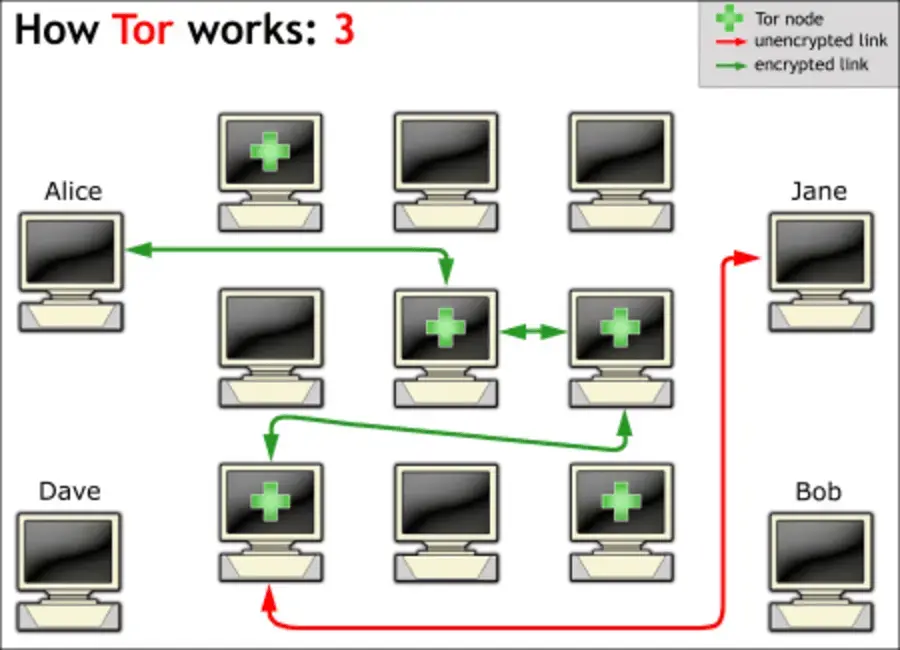
Tor utilizes onion routing to anonymize sensitive traffic.
Data is encapsulated in multiple layers of encryption—with user traffic being propagated through a circuit.
Within the circuit, user traffic goes through a path of at least three nodes—obscuring the path of origin.
Simple Breakdown:
Packet -> entry node.
Entry node (guard) decrypts the outer layer for the next hop.
Middle node decrypts its layer -> exit node.
Exit node decrypts the final layer -> revealing the original data and intended destination.
More Information May Be Found Here: ITP (NYU) Breakdown.
Garlic Routing
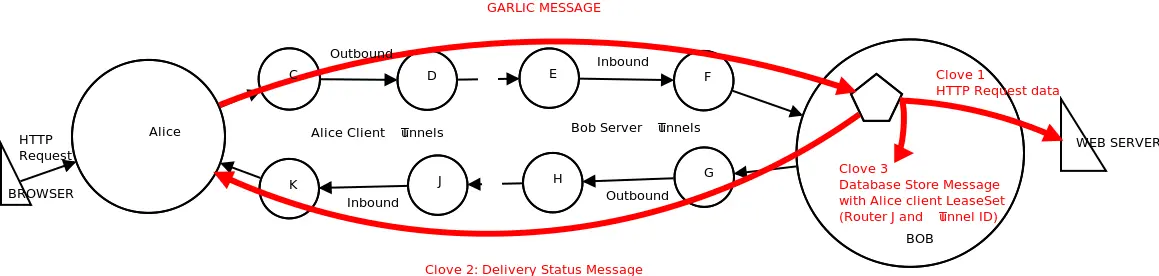
I2P uses a similar privacy-preserving routing methodology—but with a packet-switched mixnet design.
It is a natural extension of onion routing, bundling multiple cloves (messages) into a singular, encrypted “garlic” packet.
It is more resilient compared to onion routing’s individual handling, though slower because of its bundling.
Simple Breakdown:
By its nature it consequently has excellent support for P2P services.Users build unidirectional tunnels (ingress/egress) via volunteer routers.
Data is effectively layered (similar to Tor)—bundled with padding to obscure data.
Packets travel through the sender’s egress tunnel -> the recipient’s ingress.
Each node decrypts its layer, unbinding cloves at the end.
Replies use separate tunnels to avoid correlation attacks.
More Information May Be Found Here: I2P Project.
Tor Mirrors
Generating the required files is incredibly easy—as the entire process has been largely demystified and automated.
I would avoid relays/nodes, as they may present an INCREDIBLE amount of legal issues depending upon your jurisdiction.
Relays help the project stay alive, providing a viable route for users—but it is important to note that intelligence agencies co-opt this__ (whether that is “positive” or “negative” is up to your discretion).
Tor is not foolproof and does not automatically denote that your traffic is wholly secure (“1337 DaRk WeB!!!”).
The protocol by design is still quite flawed, as it is possible to decipher user origin by traffic correlation (entry/exit nodes).
Although this is really only utilized by state-level actors, its ingrained design flaw is still unavoidable.
À la compromised or rogue exit nodes.KEEP THIS IN MIND: Tor is NOT ENTIRELY QUANTUM-RESISTANT.
Analytics
Every browser has a unique fingerprint driven by its UA, system fonts, canvas, screen size, and other ingrained behaviors—presenting a significant tracking concern.
It is quite foolish to use a third-party browser with Tor support, especially given that THE MAJORITY of traffic is tied to Tor Browser’s (Firefox) standardized fingerprint.
1### Example Brave UA ###
2Mozilla/5.0 (Windows NT 10.0; Win64; x64) AppleWebKit/537.36 (KHTML, like Gecko) Chrome/137.0.0.0 Safari/537.36
Browser Tests: Cover Your Tracks (EFF), Am I Unique?, Browser Leaks.
Browser behavior IS NOTICEABLY different between Gecko and Chromium-based browsers.If you’re even on Windows at all—you’re ngmi; stop here and go reinterpret your threat model.
I hope you enjoy Copilot+ Recall!!!Generating a Tor Mirror
For demo purposes, I’m assuming a bare-install scenario and any recent Debian derivative.
I'm still in the process of migrating my VPS infrastructure to Podman; it's working fantastically on-prem though!Trixie repositories have resolved Bookworm’s persistent issue of ephemeral key loss—resulting in Tor mirrors randomly failing.
 1### Install Tor ###
 2sudo apt update
 3sudo apt install -y tor
 4
 5### Useful as This is Bare ###
 6sudo apt install -y apparmor apparmor-utils wget curl
 7
 8### Enable/Start Tor ###
 9sudo systemctl enable --now tor
10
11### Enable/Start AppArmor ###
12sudo systemctl enable --now apparmor
13
14### Sanity Check ###
15sudo journalctl -xeu tor
16sudo journalctl -xeu apparmor 1### Audit the Config ###
2sudo vim /etc/apparmor.d/system_tor
3
4### Parse the Config ###
5sudo apparmor_parser -r /etc/apparmor.d/system_tor
6
7### Enforce the Config ###
8sudo aa-enforce /etc/apparmor.d/system_tor
9
10### Sanity Check ###
11sudo aa-status
12sudo systemctl restart torConfiguring Torrc:
It's best to attach Tor to a non-standard port on loopback and let the reverse proxy (Nginx) handle it.I cannot stress how crucial it is to select HiddenServiceVersion3 over prior versions (V1/V2).
I’ll keep it germane: V2 utilizes its now antiquated SHA1/RSA-based PKI (1024-bit keys)—while V3 sports modern SHA3/Ed25519 tooling.
V3 is far more resistant to the ever-present, increasingly viable birthday attack and other adjacent collision-based attacks.SHAttered Doc (Worth Reading): SHAttered.
 1### /etc/tor/torrc ###
 2## Bridge relays (or "bridges") are Tor relays that aren't listed in the
 3## main directory. Since there is no complete public list of them, even an
 4## ISP that filters connections to all the known Tor relays probably
 5## won't be able to block all the bridges. Also, websites won't treat you
 6## differently because they won't know you're running Tor. If you can
 7## be a real relay, please do; but if not, be a bridge!
 8#BridgeRelay 1
 9## By default, Tor will advertise your bridge to users through various
10## mechanisms like https://bridges.torproject.org/. If you want to run
11## a private bridge, for example because you'll give out your bridge
12## address manually to your friends, uncomment this line:
13#PublishServerDescriptor 0
14
15HiddenServiceDir /var/lib/tor/example_mirror
16# ! V3 NOT V2 ! #
17HiddenServiceVersion 3
18# ! Select a Non-Standard Port for Loopback ! #
19# ! Useful for Reverse Proxy Integration ! #
20HiddenServicePort 80 127.0.0.1:8081
After the necessary changes have been made, you will need to restart Tor to generate the hostname and keys.
 1### Restart Tor ###
 2sudo systemctl restart tor
 3
 4### Check Output ###
 5sudo ls -lh /var/lib/tor/example_onion
 6sudo cat /var/lib/tor/example_onion/hostname
 7
 8### Output Should Be Similar ###
 9# ! /var/lib/tor/example_onion/ ! #
10total 16K
11drwx--S--- 2 debian-tor debian-tor 4.0K Nov  7 23:38 authorized_clients
12-rw-rw-r-- 1 debian-tor debian-tor   63 Nov  7 23:38 hostname
13-rw-rw-r-- 1 debian-tor debian-tor   64 Nov  7 23:38 hs_ed25519_public_key
14-rw------- 1 debian-tor debian-tor   96 Nov  7 23:38 hs_ed25519_secret_key
15
16# ! /var/lib/tor/example_onion/hostname ! #
17bh2k5od2ooelmftsiaxps3uod2fqwri5fmlh3opftl3aslk2jun3sgqd.onionOnion Vanity Addresses
Mkp224o is a popular tool for generating custom addresses, though there are some limitations.
Because we are generating these vanity addresses via brute-force key generation, you may want to keep your character prefix short.
I kept my prefix around five characters (mtuck), which only took around five seconds on my VPS.Prerequisites:
 1### Download Dependencies ###
 2sudo apt install -y git gcc libc6-dev libsodium-dev make autoconf
 3
 4### Clone the mkp224o Repo ###
 5git clone https://github.com/cathugger/mkp224o.git ~/mkp224o && cd ~/mkp224o
 6
 7### Build From Source ###
 8./autogen.sh && ./configure && make
 9
10### Generate an Address ###
11# ! -t (threads), -n (number) ! #
12./mkp224o mtuck -v -n 2 -d example_vanity
13
14# ! Output Should Be Similar ! #
15set workdir: example_vanity/
16sorting filters... done.
17filters:
18	mtuck
19in total, 1 filter
20using 1 thread
21mtuckh7hurljundnkqgkgcrgrfkavcnhpxa4vmmoestgry752fxvorad.onion
22mtuck44uiof3zofhzwl67csxc6qegyjccy4xihh45nytz5egp7ticpid.onion
23waiting for threads to finish... done.
Then you will have to move the keys/hostname into its proper directory—assuming keys/an address were already generated.
 1### Remove Old Files ###
 2# ! Cleans Keys/Hostname ! #
 3sudo rm /var/lib/tor/example_onion/h*
 4
 5### Copy Newly Generated Files ###
 6sudo cp ~/mkp224o/example_vanity/gend-address/h* /var/lib/tor/example_onion/
 7
 8### Set Proper Ownership ###
 9# ! Debian Uses debian-tor ! #
10sudo chown -R debian-tor:debian-tor /var/lib/tor/example_onion
11
12### Verify Perms Are Correct ###
13sudo ls -lh /var/lib/tor/example_onion/
14
15### Verify Hostname Is Correct ###
16sudo cat /var/lib/tor/example_onion/hostname
Generating an I2P Mirror
1### Download I2PD ###
2sudo apt update
3sudo apt install -y i2pd
4
5### Enable I2PD ###
6sudo systemctl enable --now i2pd 1### Pull I2PD's AA Profile ###
2sudo wget -O /etc/apparmor.d/usr.bin.i2pd https://raw.githubusercontent.com/PurpleI2P/i2pd/refs/heads/openssl/contrib/apparmor/usr.bin.i2pd
3
4### Audit the Config ###
5sudo vim /etc/apparmor.d/usr.bin.i2pd
6
7### Parse the Config ###
8sudo apparmor_parser -r /etc/apparmor.d/usr.bin.i2pd
9
10### Enforce the Config ###
11sudo aa-enforce /etc/apparmor.d/usr.bin.i2pd
12
13### Sanity Check ###
14sudo aa-status
15sudo systemctl restart i2pdConfiguring I2PD
As I intend this article to be geared toward simply hosting hidden services, I unfortunately won’t touch on I2PD-specific security (for now, haha).
Not to mention documentation is quite lackluster compared to the Tor Project.I2PD will be the lightest solution (currently) available, with most mainstream repositories supporting it by default.
 1### /etc/i2pd/i2pd.conf ###
 2## Bandwidth configuration
 3## L limit bandwidth to 32 KB/sec, O - to 256 KB/sec, P - to 2048 KB/sec,
 4## X - unlimited
 5## Default is L (regular node) and X if floodfill mode enabled.
 6## If you want to share more bandwidth without floodfill mode, uncomment
 7## that line and adjust value to your possibilities. Value can be set to
 8## integer in kilobytes, it will apply that limit and flag will be used
 9## from next upper limit (example: if you set 4096 flag will be X, but real
10## limit will be 4096 KB/s). Same can be done when floodfill mode is used,
11## but keep in mind that low values may be negatively evaluated by Java
12## router algorithms.
13# ! Changed Mine to P (up to You) ! #
14bandwidth = P
15
16[http]
17## Web Console settings
18## Enable the Web Console (default: true)
19# ! Best to Disable the Web Console Later ! #
20# ! Useful for Diagnostic Info ! #
21enabled = false
22
23## Port to listen for connections
24## By default i2pd picks random port. You MUST pick a random number too,
25## don't just uncomment this
26# ! Set to a Custom Port ! #
27# ! Allow TCP/UDP Through WAF/Nftables ! #
28port = 4400
After we’ve configured I2PD itself, we need to handle our firewall!
 1### UFW Config ###
 2sudo ufw allow 4400/tcp
 3sudo ufw allow 4400/udp
 4
 5# ! Verify ! #
 6sudo ufw status numbered
 7
 8### IPtables Config ###
 9sudo iptables -A INPUT -p tcp -m tcp --dport 4400 -j ACCEPT
10sudo iptables -A INPUT -p udp -m udp --dport 4400 -j ACCEPT
11
12# ! Verify ! #
13sudo iptables -L -v
14
15# ! Save if Needed ! #
16sudo netfilter-persistent save
Now that I2P can actually communicate within its network, we can finally configure our eepsite!
 1### /etc/i2pd/tunnels.conf ###
 2# ! Comment Out Anything Unnecessary ! #
 3# ! Fine To Edit Here ! #
 4[eepsite]
 5type = http
 6host = 127.0.0.1
 7port = 9090
 8keys = eepsite.dat
 9# ! Reverse Proxy Will Handle This ! #
10gzip = false
A Quick Restart Is in Order:
1### Generates our Key ###
2sudo systemctl restart i2pd
3
4### Check the Console (if Enabled) ###
5curl http://127.0.0.1:7070
We’re nearly there, but unlike Tor—I2PD doesn’t provide readable hostnames.
You may access this through the web console, but I find it to be counterintuitive.
Especially considering you'd be required to use software like Lynx.You can absolutely use i2pd-tools, but we can just pull the address directly.
That repo is pertinent toward generating vanity addresses—but that doesn't concern me.1### Pulling the Base32 Address ###
2sudo apt install -y xxd
3sudo sh -c 'printf "%s.b32.i2p\n" $(head -c 391 /var/lib/i2pd/eepsite.dat | sha256sum | xxd -r -p | base32 | sed s/=//g | tr A-Z a-z)'
4
5# ! Output Should Be Similar (Base32) ! #
6mqfp6dvkrpf452mvwp2ouzh7dkn4swb7dhbaas76rtpurysdckoq.b32.i2pReverse Proxy Integration
Integrating hidden services with your existing reverse proxy is largely hassle-free.
Headers help clients switch to their desired mirror without having to scrounge for addresses.
Tor has had existing support via the Onion-Location header, but seamless I2P discovery is not as widely adopted.
Adding a custom header similar to Tor’s onion-location or Alt-Svc are the most sane options.
Feel Free to Reference My Web Hardening Article for Further Security Considerations: Web Hardening.
Headers
 1### /etc/nginx/sites-available/main ###
 2server {
 3    # ! Tor - Onion Header ! #
 4    add_header Onion-Location "http://mtuckod2ooelmftsiaxps3uod2fqwri5fmlh3opftl3aslk2jun3sgqd.onion$request_uri" always;
 5
 6    # ! I2P - Eeepsite Header ! #
 7    # ! Optional (Not Yet Widely Adopted) ! #
 8    add_header Alt-Svc 'i2p="eepsite.b32.i2p:80"; ma=86400' always;
 9
10    # ! Inlcude Security Headers ! #
11    include /etc/nginx/snippets/security-headers.conf;
12    include /etc/nginx/snippets/error-pages.conf;
13
14# ! ↓ Site Config ↓ ! #
15}
Tor Nginx Config
 1### /etc/nginx/sites-available/tutorial_tor ###
 2# ! Clearnet Redirect ! #
 3server {
 4    listen 80;
 5    server_name tor;
 6    return 301 https://sld.tld$request_uri;
 7}
 8server {
 9    # ! Only Accepting Tor ! #
10    listen 127.0.0.1:8081;
11    server_name site.onion;
12
13    # ! Include Web Contents ! #
14    root /var/www/example_onion;
15    index index.html;
16
17    # ! Include Security Configs ! #
18    include /etc/nginx/snippets/tor-security-headers.conf;
19    include /etc/nginx/snippets/tor-error-pages.conf;
20
21    # ! Blocks Local Leaks ! #
22    allow 127.0.0.1;
23    deny all;
24
25    # ! Inlcude Security Headers ! #
26    # ! Remove HTTPS Related Headers ! #
27    include /etc/nginx/snippets/hidden-security-headers.conf;
28    include /etc/nginx/snippets/hidden-error-pages.conf;
29
30    # ! Logging - Respects Privacy (Hard to Correlate Anyways) ! #
31    access_log off;
32    error_log /var/log/i2p-error.log warn;
33
34# ! ↓ Site Config ↓ ! #
35}1### Link the Site ###
2sudo ln -s /etc/nginx/sites-available/tutorial_tor /etc/nginx/sites-enabled/tutorial_tor
3
4### Test Config ###
5sudo nginx -t
6
7### Reload Nginx ###
8sudo nginx -s reloadI2P Nginx Config
Configuring an I2P mirror is quite similar to Tor; just ensure that you are using a different port to properly segment traffic.
 1### /etc/nginx/sites-available/tutorial_i2p ###
 2# ! Clearnet Redirect ! #
 3server {
 4    listen 80;
 5    server_name i2p;
 6    return 301 https://sld.tld$request_uri;
 7}
 8server {
 9    # ! Only Accepting I2P ! #
10    listen 127.0.0.1:9091;
11    server_name eepsite.b32.i2p;
12
13    # ! Include Web Contents ! #
14    root /var/www/example_eepsite;
15    index index.html;
16
17    # ! Include Security Configs ! #
18    include /etc/nginx/snippets/i2p-security-headers.conf;
19    include /etc/nginx/snippets/i2p-error-pages.conf;
20
21    # ! Blocks Local Leaks ! #
22    # ! I2P Uses a Larger Local Subnet ! #
23    # ! You Need To Be Permissive ! #
24    allow 127.0.0.0/8;
25    deny all;
26
27    # ! Inlcude Security Headers ! #
28    # ! Remove HTTPS Related Headers ! #
29    # ! Only Covering HTTP for I2P (for Now) ! #
30    include /etc/nginx/snippets/hidden-security-headers.conf;
31    include /etc/nginx/snippets/hidden-error-pages.conf;
32
33    # ! Logging - Respects Privacy (Hard to Correlate Anyways) ! #
34    access_log off;
35    error_log /var/log/i2p-error.log warn;
36
37# ! ↓ Site Config ↓ ! #
38}1### Link the Site ###
2sudo ln -s /etc/nginx/sites-available/tutorial_i2p /etc/nginx/sites-enabled/tutorial_i2p
3
4### Test Config ###
5sudo nginx -t
6
7### Reload Again (if Necessary) ###
8sudo nginx -s reloadAccessing Your Mirrors
Because we aren’t hosting on the conventional clearnet, we’ll need to LOCALLY download specialized software/profiles for accessing our sites.
 1### Tor ###
 2# ! Useful for Auto-Updates/Security ! #
 3# ! Including Flatseal ! #
 4flatpak install org.torproject.torbrowser-launcher com.github.tchx84.Flatseal
 5
 6# ! Manage Flatpak Perms (if Desired) ! #
 7flatpak run com.github.tchx84.Flatseal
 8
 9# ! Run the Browser ! #
10flatpak run org.torproject.torbrowser-launcher
11
12## I2P ###
13# ! Install Locally ! #
14# ! Flatpak was Finicky for Me ! #
15sudo apt update
16sudo apt install -y i2pd
17
18# ! Edit the Local I2PD Config as Stated Above ! #
19# ! Ignore Eeepsite Generation ! #
20sudo systemctl enable --now i2pd
21
22### Build a Specialized I2PD Browser (Firefox) ###
23sudo apt install -y curl tar screen
24cd ~; git clone https://github.com/daviduhden/i2pd-browser/
25cd i2pd-browser/build && ./build
26
27# ! Start the Browser ! #
28cd ../; ./start-i2pd-browser.desktop
29
30# ! Permit if Needed ! #
31chmod +x ~/i2pd-browser/start-i2pd-browser.desktop
32
33# ! Monitor the Web Console ! #
34# ! NAT Issues May Arise ! #
35# ! Can't Help Here (Sorry) ! #
36http://127.0.0.1:7070
Deployed Mirrors
Taken from my open library.

Outcomes
If everything went swimmingly, you should have both an I2P and Tor mirror deployed for your site.
Deploying additional mirrors follows the same playbook, but make sure (REQUIRED) to segment each mirror to its respective port.
Note: A simple apt purge will resolve any residual misconfiguration.Another Thing to Keep in Mind:
It would be wise to provide cryptographic proof of any operated sites; clear-signing is less clunky for individual statements.
1gpg --clear-sign privacy-policy.txt
2gpg --clear-sign miror-statement.txt
Closing
The “dark web” connotes a notoriously poor impression from “privacy” types, but don’t let that dissuade you.
Every corner of the internet has its bad actors—though admittedly there is some truth about the “privacy” community and their collective behavior.
Be wary of others online, especially in Fediverse cesspools like Mastodon and similar (questionable) E2EE messengers like Matrix.
Any private or E2EE service procures some level of “hacker” mystique, but deploying and maintaining mirrors is rather straightforward (not to mention boring).
Architecting your own infrastructure provides a far better learning path than lazily slapping web files on GitHub/GitLab pages.
Trust me, that labor bears menial fruit; go lease a $5 VPS, you're better than that!
Shoot for learning first and ditch performative "projects."
If you are operating a mirror or really any online service, I ask that you respect your users’ privacy.
Why bother building a platform if you operate on hypocritical principles?